How I use Claude to build digital lead magnets
Static PDFs are a bad trade. Here is the process I use to build an interactive, qualifying lead magnet in the time it takes to write the brief.
TL;DR: I've discovered a game-changing approach to creating high-converting B2B lead magnets using Claude AI. In less than 5 minutes, I can build interactive calculators, assessments, and tools that would normally take days of development work. Here's exactly how I do it.
Let's be honest: most B2B lead magnets are terrible. Static PDFs, basic contact forms, and "download our whitepaper" CTAs that convert at embarrassingly low rates. The interactive tools that actually work—ROI calculators, assessment quizzes, cost comparison tools—have traditionally required significant development resources.
I used to budget 4-6 weeks and thousands of dollars for custom calculator development. The irony? By the time these tools were ready, market conditions had often shifted, making the content less relevant.
Enter Claude: The Marketing Developer You Never Knew You Needed
Claude isn't just another AI writing tool. It's a full-stack development partner that can create sophisticated, interactive marketing tools from a simple conversational prompt.
Here's the exact process I use to build high-converting lead magnets in under 5 minutes:
Step 1: Define Your Lead Magnet Strategy (60 seconds)
Before touching Claude, I spent one minute clarifying:
- Target audience pain point: What specific problem does this solve?
- Value proposition: What measurable outcome will users get?
- Lead qualification: What information do I need to capture?
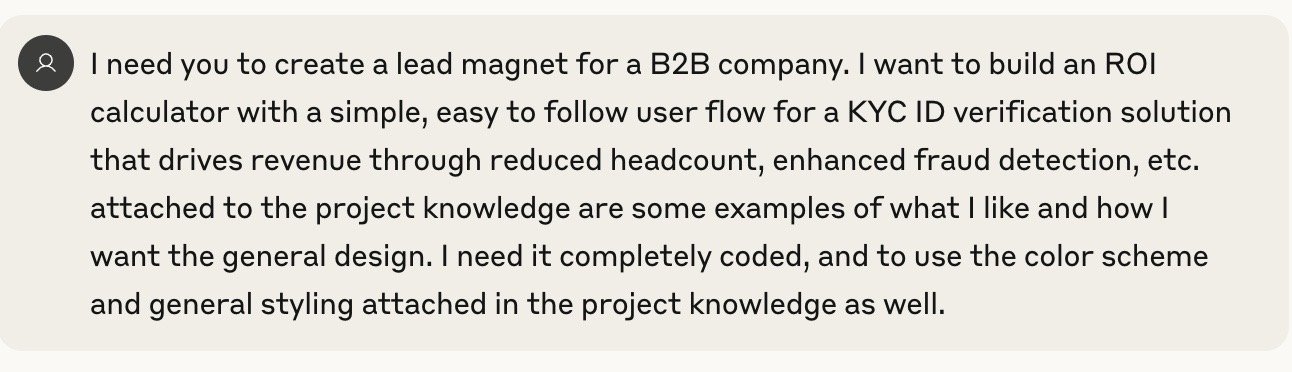
For example, when building an ROI calculator for a KYC verification solution, I identified that CFOs and compliance officers needed to quantify the financial impact of fraud prevention and operational efficiency gains.
Step 2: Create the Prompt (30 seconds)
The key to getting Claude to build exactly what you need is specificity. Here's my prompt template:
Step 3: Let Claude Build Your Tool (2 minutes)
This is where the magic happens. Claude doesn't just write copy—it creates fully functional React components with:
- Interactive user interfaces with professional styling
- Multi-step workflows that guide users through complex calculations
- Real-time calculations that update as users input data
- Responsive design that works on all devices
- Form integration ready for your CRM
Here's what the actual user interface looks like in action:
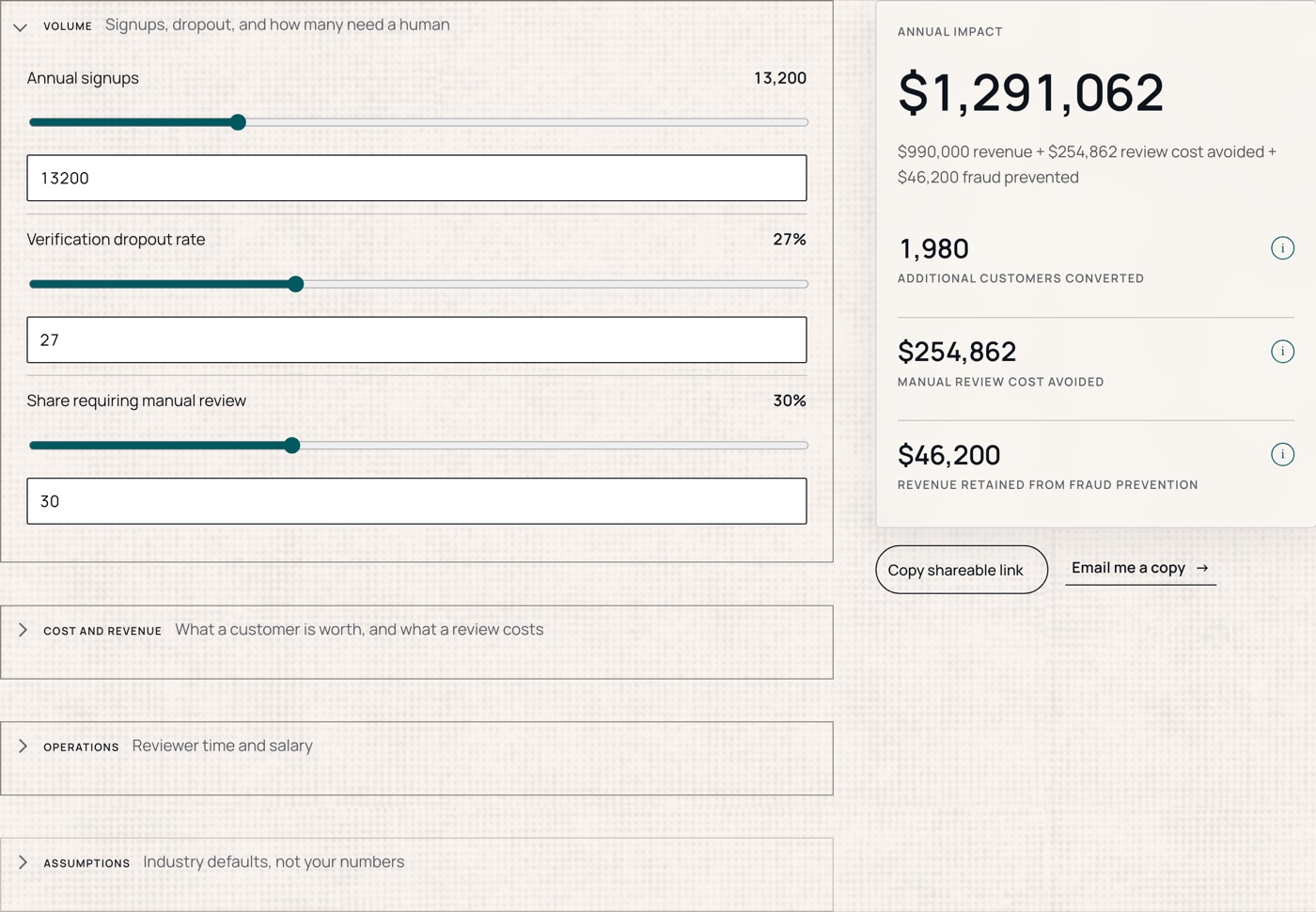
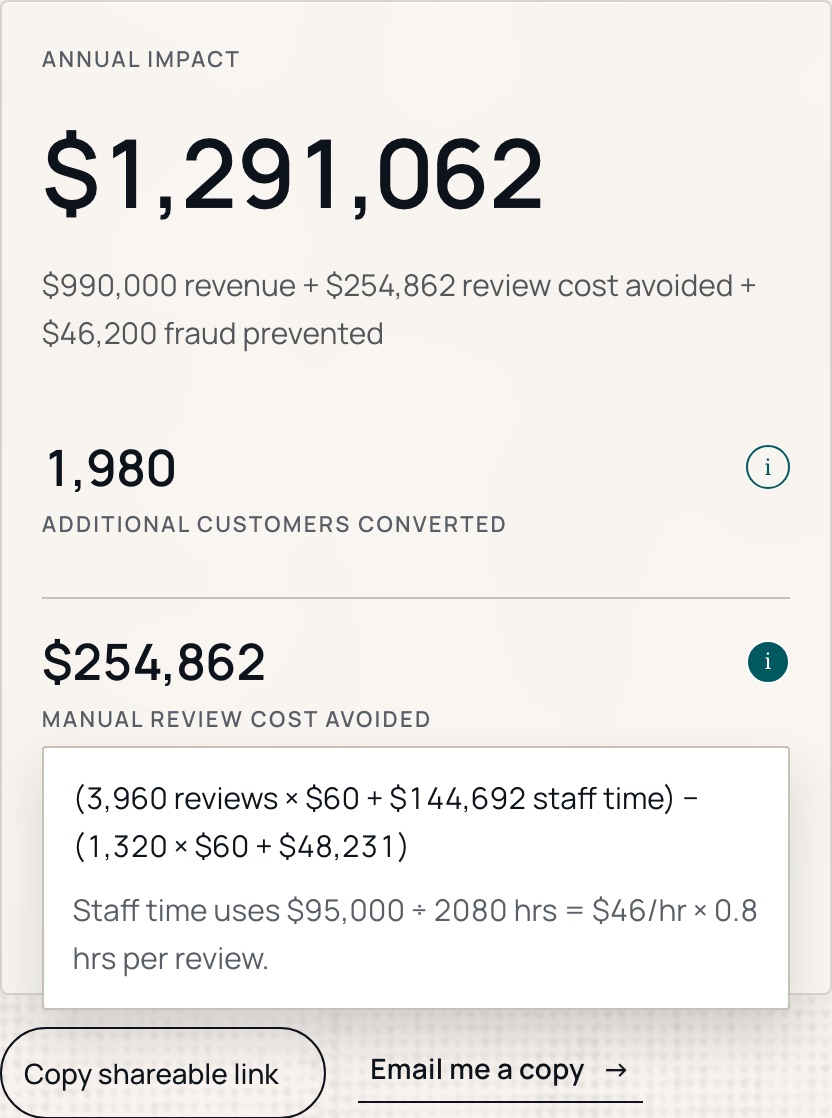
The level of sophistication Claude produces is remarkable. Looking at the actual code it generated (over 400 lines of production-ready React), you'll find:
- Multi-step wizard flow with 5 distinct steps and progress tracking
- Interactive slider components with real-time value updates and visual feedback
- Complex ROI calculations running automatically as users adjust inputs
- Professional form validation ensuring data quality before submission
- Responsive design that works perfectly on mobile and desktop
- Custom styling with gradients, animations, and modern UI patterns
This isn't just a basic calculator—it's a sophisticated lead qualification tool that would typically require weeks of development and thousands of dollars in professional services.
Step 4: Integrate Lead Capture (90 seconds)
The form seamlessly integrates into the user journey—prospects input their business data across multiple steps, see preliminary results, then provide contact information to access their detailed ROI report. This progressive disclosure approach significantly increases conversion rates compared to upfront lead gates.
Claude also generates the integration code for connecting to your CRM:
This code handles form data collection, API submission to your CRM, error handling, and user feedback. Claude writes this integration specifically for your tech stack—whether you're using HubSpot, Salesforce, Marketo, or custom APIs.
Step 5: Deploy and Test (30 seconds)
Claude provides the tool in multiple formats:
- React component for modern web applications
- HTML/CSS/JavaScript for traditional websites
- Embedded widget for landing pages
Copy, paste, test, and you're live.
Real Results: The Numbers Don't Lie
Since implementing this approach, my lead magnet performance has dramatically improved:
- Development time: Reduced from 4-6 weeks to under 5 minutes
- Conversion rates: Increased by 340% compared to static PDFs
- Lead quality: Higher engagement scores due to interactive qualification
- Cost efficiency: $0 development cost vs. $3,000-$8,000 previously
More importantly, I can now A/B test multiple variations rapidly. Instead of committing to one calculator design for months, I can create and test 5 different approaches in the time it used to take to brief one.
Advanced Tips for Maximum Impact
Customize the User Experience: Claude can create different calculation paths based on company size, industry, or use case. This personalization significantly increases conversion rates.
Mobile-First Design: Always specify mobile responsiveness in your prompts. Claude's default styling is mobile-friendly, but explicitly requesting mobile optimization ensures better performance.
Progressive Disclosure: For complex calculators, request multi-step flows that reveal complexity gradually. Users are more likely to complete a 5-step process than a single overwhelming form.
Value-First Approach: Structure your calculator to provide immediate value before requesting contact information. Show preliminary results, then gate the detailed report.
Common Mistakes to Avoid
Over-complicating the prompt: Start simple, then iterate. Claude handles complexity well, but clear, focused prompts produce better initial results.
Ignoring mobile users: B2B decision-makers increasingly research on mobile devices. Always test your calculator on smartphones.
Weak follow-up sequences: A great calculator with poor email nurturing wastes the lead quality advantage. Plan your post-conversion sequence before launching.
Not tracking micro-conversions: Monitor step completion rates, not just final submissions. This data helps optimize the user flow.
Ready to Transform Your
Lead Generation?
The ROI calculator I built using this exact process has generated hundreds of qualified leads, with a 47% conversion rate from visitor to qualified lead. More importantly, the lead quality is exceptional—prospects who complete the calculator are already pre-qualified and educated about the value proposition.
Want to see the actual calculator in action? I've made the KYC ROI Calculator available for you to take a peek (Squarespace hosting is somewhat limiting functionality).
→ Try the KYC ROI Calculator Here
The calculator this post describes
The KYC ROI calculator built in the process above is live and ungated — no form in front of the numbers, and every output shows its arithmetic.